So, I”ve talked about my radio, what I do on DMR, what”s missing now? I know, the hotspot! Before beginning, thanks to the peeps at FinDMR for answering my (probably stupid) questions.
Briefly mentioned before as well, the hotspot is actually the second most important part of DMR in some cases. For instance, if you want to chat on remote talkgroups, it”s generally recommended to do it via a hotspot to avoid clogging up the local repeater. It also gives you more agency on which talkgroups are linked and when.
Personally, I use a Pi-Zero MMDVM hotspot running Pi-Star. It”s tiny, runs with practically nothing, and all things considered is pretty cheap for the things it does. Of course, it”s still an additional cost over the initial investment of buying the radio, but worth it in my opinion.
Configuring the hotspot might seem like an herculean task, but in fact, the BrandMeister wiki has a guidance page for Finland specifically (and there”s a good chance there”s one for your country if DMR is popular there).
In the end, configuring the hotspot properly means:
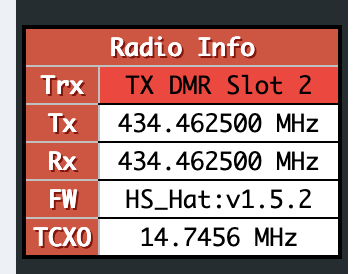
- Setting it up around 434.4625MHz.
- Setting a colour code other than 1.
- Remember to fill out all the essential info (location, etc).
This is mainly so the hotspot won”t interfere with local repeaters. Other general recommendations are:
- Set the hotspot to “Private” (should be by default) so only yourself can transmit on it.
- Setup AirSecurity in the BrandMeister self-care panel.
- This is basically TOTP so nobody impersonates you.
- I can also recommend enabling “Secure local pass”. This basically makes it so you don”t have to authenticate when using your private hotspot.
- Setup the BrandMeister API integration.
- This will allow you to manage the static talkgroups of the hotspot without having to use the BrandMeister console.
And there you go, it”s that easy. You can now talk anywhere, any time; just remember to shut it down when you”re done.