Jae's Blog Creatures and blogs.

Music recommendations for May 2025

Time for the monthly music post. On Friday 2nd of this month, there was the Bandcamp Friday, so there’s a bit more recommendations today.

I usually wait for the Bandcamp Friday to do big sweeps of buying music as 100% goes to the artist during that time.

In any case, here are the recommendations:

  • Full discography of Cerealbowlsystem: Someone I know from the Resonite community, cool bean, good music, can recommend checking it out.
  • Port Rhombus by Squarepusher: last month had a lot of Squarepusher, this one as well. This album was recommended by a friend and plays nicely into the jazzy style I like in Squarepusher’s music, especially when it comes to the second track.
  • Graveyard Orbit by BUNKR: this one has been sitting in my wishlist for a while. As you might expect from the title, the style of music reminds me of a spatial action game. This album is a breeze to listen to and I can recommend if you like chill space-y stuff.
  • あじたま見聞録② and Dream Chasers by ああああ(AAAA), 翡乃イスカ(Hino Isuka) and 梅干茶漬け(Umeboshi Chazuke): I’m grouping those two albums together because they contain music from rhythm games I used to play years ago. Overall great music albums, perfect if you’re a fan of rhythm games as well (you might have even heard those before).
  • Gear 4 by ANORAK: this one caught my attention on the discovery page. Not sure how to describe why I like it, but I do, and recommend it. This album is also very recent, being released on May 1st of this year!
  • LEVEL SELECT by Pizza Hotline: one of my favourite discoveries of this batch. I almost ordered the PAL PS1 disc version, but decided not to given all the import and transport fees making it super expensive. In any case, excellent music.
  • Horizon by Resavoir & Matt Gold: this one is a pre-order, something I usually don’t do. I was looking for more jazzy tracks and Bandcamp delivered in this album from which the two preview songs being currently available felt like audio candy. I can’t wait to discover what the rest of the album holds.
  • Full discography of SQUIDGY: this one was a last-minute addition to my collection. Right before heading to bed, a friend sent a link to the “POKEDEX VOL 1.” album which was an instant match for me. So far, my favourite song in the lot is “✧⊹ARCEUS⊹✧”.

And remember, don’t forget to support the artists you like. There’s a good website to know when is the next Bandcamp Friday, aptly named “Is it Bandcamp Friday?”. Next one will be in August of this year.

A guide for ARM Resonite session servers

You might be familiar with my set of libraries that allows people to run the Resonite Headless Server Software on ARM-based machines.

Well just fresh out of the oven, created yesterday, we now have a guide on how to exactly run a headless on ARM on the Resonite wiki.

While this is not supported officially, there has been a lot of success in getting this working, the last annoying component being SteamWorks.NET.

If you have any improvements for the page, don’t hesitate to put them on the talk page or to edit the page directly!

The best way to edit wikis

I’m a frequent editor on the Resonite wiki, meaning I spend quite a lot of time editing pages (duh).

Recently, I’ve discovered the best way of editing the wiki so far, all from my favourite code editor, Sublime Text.

For this, you’re going to need to set up packagecontrol and install the Mediawiker extension.

Once you have the extension installed, head to “Preferences” → “Package settings” → “Mediawiker” → “Settings”.

Copy the default configuration on the left to the right pane, and within the copy, add the following configuration (note that this is mine, so feel free to modify it to fit your needs):

"site":
{
    "Resonite Wiki": {
        "authorization_type": "cookies",
        "host": "wiki.resonite.com",
        "path": "/",
        "pagepath": "/",
        "username": "",
        "password": "",
        "domain": "",
        "https": true,
        "is_ssl_cert_verify": true,
        "proxy_host": "",
        "use_http_auth": false,
        "http_auth_login": "",
        "http_auth_password": "",
        "oauth_access_secret": "",
        "oauth_access_token": "",
        "oauth_consumer_secret": "",
        "oauth_consumer_token": "",
        "cookies_browser": "firefox",
        "preview_custom_head": [],
        "retry_timeout": 30,
        "is_wikia": false,
        "show_red_links": false,
        "preview_sandbox": "",
        "search_namespaces": "",
        "summary_fail_buf": "",
    },
},Code language: JavaScript (javascript)

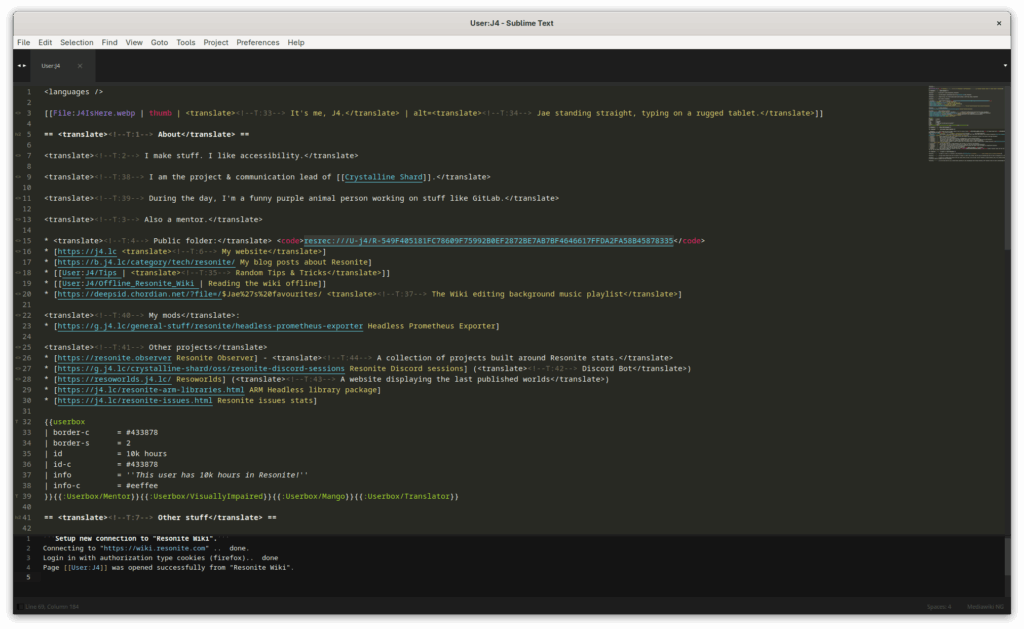
Now to use this, make sure you’re logged into the wiki using Firefox, do CTRL+SHIFT+P, then “Mediawiker: Open Page”, type a page name (for instance User:J4 in my case), and voilà, you can now edit the wiki from the comfort of Sublime Text.

Screenshot of Sublime Text showing the user page of the user J4, highlighting wikitext syntax.

When you save the file, it will ask you to enter a change set description and will sync your changes to the wiki.

Have fun editing!

So many drafts

I have at least 10 posts for this blog in the pipeline, all of which are blocked at the draft stage right now.

So, that’s what it’s like to have writer’s block huh.

New backpack!

Recently, I needed to purchase a new backpack because my old one, some Lenovo one, seriously started tearing and having other issues.

I scoured the web for a bit until I realized HELLOTUX, the ones behind the official Fedora merch, also conveniently make a backpack.

Shipping went really well, it took around a week for the package to arrive to Finland (shipped from Hungary).

Overall, the quality of the backpack is great, and I recommend to anyone wanting to get cool stuff from your favourite distro to get it from HELLOTUX.

As for me, I can finally put the old one to rest, I might have done some horrible things to that poor thing, namely accidentally pouring Pho on it once.

If you’re a Fedora fan, remember that the code FEDORA5 allows you to get €5 off any Fedora item in the basket.

Fine, I’ll do it again

It’s no surprise that I hate how search engines have evolved over the years. Going back 10–15 years, those were really useful and gave you the information you wanted, when you wanted.

Nowadays, results are only slop and ads, which completely defeats the purpose of a search engine.

Well, time to change this. Back a few years ago, I made a small search engine PoC. It never really worked, and the only part that was well-made was the front-end, which someone else made.

I’ve started drafting for a new search engine, that will not be reliant on other indexes, no AI slop, and fully EU-based.

I’ll keep you peeps posted at milestones of development. Expect a proper announcement later, when it is started properly.

The Helsinki airport is more active than I thought

I live near the Helsinki airport and can spot planes arriving from the west fairly easily through my window. What I never noticed before is how many planes are arriving during the weekend.

Screenshot of a map showing a bunch of planes with a large concentration on the Helsinki airport.
Screenshot from ADS-B Exchange

Starting from 06:00 and happening every few hours or so, there’s a whole ballet of planes landing and taking of, way more than I anticipated.

That also means the airband is very active, so that keeps me busy listening to it.

Some signals I managed to receive

After playing a bit with my HackRF, I managed to receive some stuff.

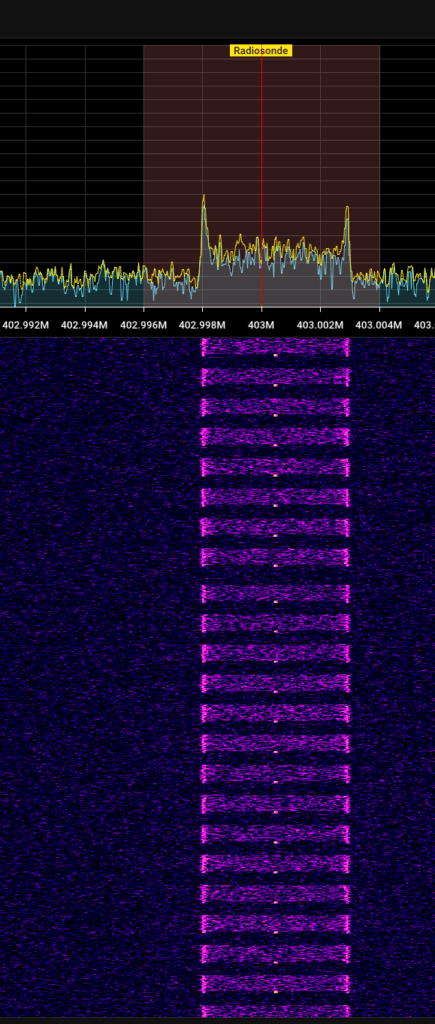
Every day or so, balloons called “radiosondes” are launched, and I can actually receive those.

The payload you see below contains position data, battery status, altitude, and a bunch of other stuff.

If you’re curious about receiving those, there is a website tracking those, their TX frequency and all the data.

Warterfall display on an SDR showing quick bursts of data every second or so.

Airband is used by planes to communicate with the ground. Given I live near the Helsinki airport, I’m in a prime location to receive those properly.

For instance, here is small compilation of recordings:

Do note listening to airband might be illegal in some countries, for instance, Germany or North Korea. Always check your local laws (though unenforceable).

How to use the HackRF on Linux

Just yesterday, I received my HackRF PortaPack. The HackRF is basically an SDR, or Software-Defined Radio, that allows you to plug it to a computer and have a nice spectrum view of everything (amongst other things).

While the PortaPack integrates its own screen, battery and everything, I find it more convenient to connect it to my computer and use it that way. I can record more easily, have a larger view thanks to my monitor, etc, etc.

First thing I did was to update the firmware. Luckily, it’s really easy to do so, I just had to download the latest version of Mayhem, put it on a micro-SD card, use the internal flash tool, and done, all up-to-date.

Now, a lot of sellers will try to give you some SDR software to use with the HackRF: don’t listen to them. Instead, try SDR++, a Free and Open-Source SDR software, with built-in support for the HackRF. Added bonus: it’s even in the Fedora repositories! As a side note, you might need to add your user to the dialout group before starting to use it.

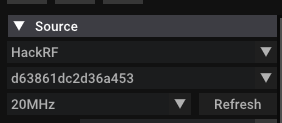
Once you have SDR++ installed, just head to the top right, in the “Source” section, in the scrolling menu select “HackRF”, and right below, select your HackRF (there should only be one).

Screenshot of SDR++ showing the Source section having the HackRF selected.

Right below, I can recommend setting both the “LNA gain” and “VGA gain” to something like 16, it’ll make sure you can actually hear anything.

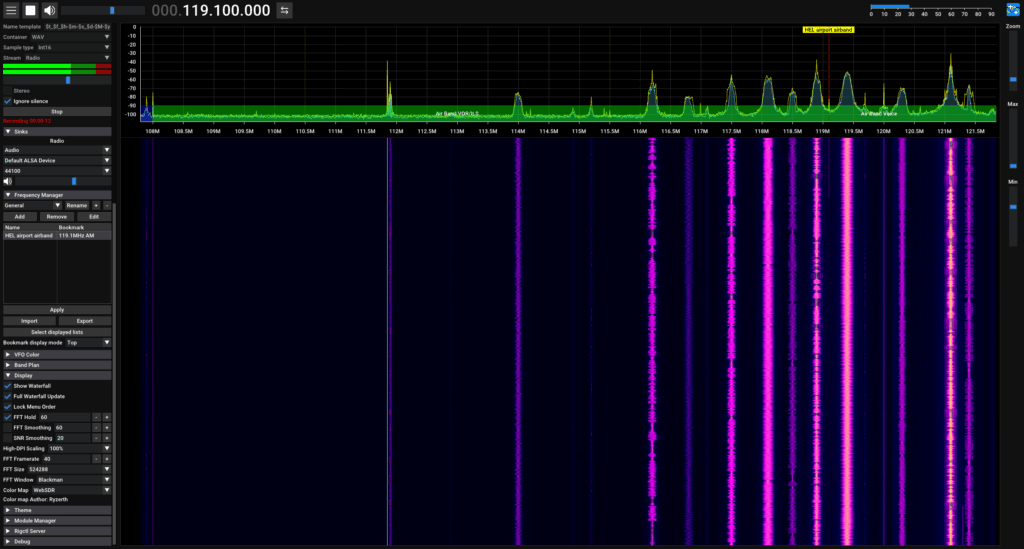
Other settings I can recommend tweaking a bit are within the “Display” section, near the bottom on the right. Do note those settings are my own preference:

  • FFT Hold: enabled, 60
  • FFT Framerate: 40
  • FFT Size: 524288 (this avoids having the waterfall look “blocky” when zooming in, but has a performance cost when de-zoomed)
  • FFT Window: blackman
  • Color map: WebSDR

Those settings basically reproduce the WebSDR look and feel that I’m used to (for instance, from the Twente WebSDR).

Full screenshot of the application showing a waterfall with really strong signals.

Now time to listen! To make things better, I can also recommend playing with the “Squelch” option. You might need to tweak this differently based on which frequency you want to listen to.

In any case, have fun listening to whatever you can find!

Let me access content dammit

I hang out quite a lot in Bellingcat‘s Discord, mainly because there’s cool research being done in there, and being in there is also a good way to stay informed.

Of course, as with any Discord guild, it is inaccessible to anyone without an account, however that’s no the subject of this post.

If you remember a year or two ago, during the slow destruction of Twitter, people flocked en masse to Bluesky, which marketed itself as a better alternative. This is more than ever present in OSINT communities like Bellingcat’s where Bluesky has largely replaced Twitter links.

Fast track to today and Bluesky is owned by cryptobros, cuddles up to dictators to silence political opposition, and has login screens on half the posts (and yes, I know, those are the users selecting the option). Great strides in making content accessible to everybody, right? Nothing is more frustrating than hurting a login wall after seeing a working embed displaying the content of the post.

I’d go as far as to say the “logged in only” setting for a place as public as Bluesky makes no sense at all. If you don’t want people to see your post, then don’t post it or post it in private, not half public, as simple as that.

Newer Posts · Older Posts
Jae 2012-2025, CC BY-SA 4.0 unless stated otherwise.